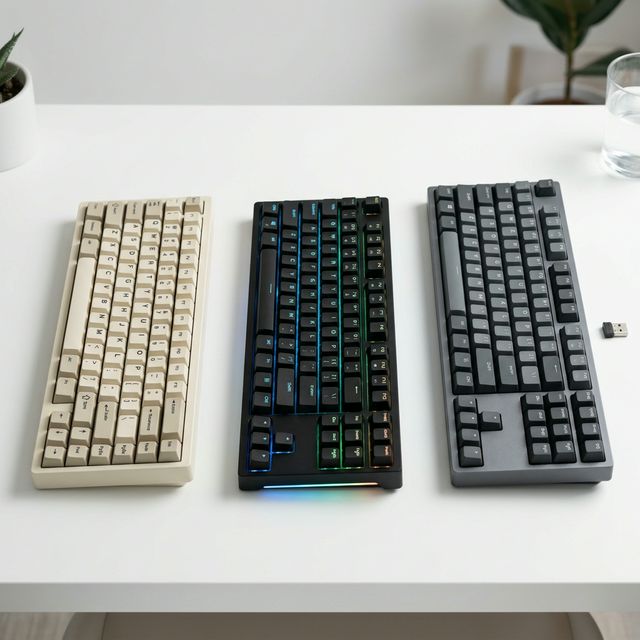
Three years ago, “wireless mechanical keyboard” was still a compromise build. You dealt with lag, you accepted mediocre battery life, and you prayed nothing would cut out mid-game or mid-deadline. In 2026, those problems are essentially solved. The best wireless mechanical keyboards today are just as responsive as their wired counterparts — and considerably cleaner on your desk.
This guide covers the 5 best wireless mechanical keyboards available right now, from budget-friendly entry points to premium all-aluminum endgame builds.
What to Look for in a Wireless Mechanical Keyboard
Before the list, here’s what actually matters when shopping wireless:
- Polling rate & latency: Look for 2.4GHz dongles over Bluetooth for lower latency. Bluetooth 5.1+ is fine for typing, slightly less ideal for competitive gaming.
- Battery life: Anything under 30 hours on a single charge is disappointing in 2026. Good boards now do 100–500 hours without backlight.
- Connectivity options: The best boards support 2.4GHz + Bluetooth + wired — so you’re never locked out.
- Hot-swap PCB: Still important. You want to be able to swap switches without soldering.
Quick Comparison
| Keyboard | Price | Connectivity | Battery | Layout | Best For |
|---|---|---|---|---|---|
| Keychron Q1 Max | ~$199 | 2.4GHz + BT + Wired | ~300hrs | 75% | Best all-rounder |
| NuPhy Air75 V2 | ~$149 | 2.4GHz + BT + Wired | ~200hrs | 75% | Portability & travel |
| Logitech MX Mechanical | ~$159 | Logi BOLT + BT | ~10 days (backlit) | TKL | Office & multi-device |
| NuPhy Halo75 | ~$129 | 2.4GHz + BT + Wired | ~150hrs | 75% | Value + RGB |
| Royal Kludge RK84 Pro | ~$79 | 2.4GHz + BT + Wired | ~200hrs | 75% (84-key) | Budget pick |
👉 Shop Wireless Mechanical Keyboards on Amazon – See Today’s Prices →
1. Keychron Q1 Max — Best Overall Wireless
Price: ~$199 | Layout: 75% | Battery: ~300 hours (no backlight)
The Keychron Q1 Max keeps appearing at the top of every best-of list, and for good reason: it’s a full aluminum gasket-mount keyboard with a QMK-compatible PCB, hot-swap sockets, triple connectivity (2.4GHz / Bluetooth / Wired), and the kind of build quality that makes you feel justified spending $200.
What we love:
- Full aluminum chassis with gasket mount — the sound and feel are premium at every keystroke
- 2.4GHz dongle for near-zero latency wireless — works great for gaming too
- QMK/VIA compatible — remap every single key without software running in the background
- The volume knob is genuinely one of the most underrated features on any keyboard
Real talk: It’s heavy (2kg). It’s not a keyboard you throw in a bag daily. And at $199, it’s a real commitment. But if this is staying on your desk and you want wireless that feels wired — this is the one.
Verdict: ⭐⭐⭐⭐⭐ — The wireless mechanical keyboard to beat in 2026.
2. NuPhy Air75 V2 — Best for Portability
Price: ~$149 | Layout: 75% | Battery: ~200 hours (no backlight)
The NuPhy Air75 V2 is the keyboard for people who actually leave their desk. At under 750g, it’s light enough to toss in a laptop bag alongside a 14″ MacBook without thinking twice. It doesn’t sacrifice much to get there.
What we love:
- Gasket mount in a travel-friendly aluminum body — impressive for the weight
- Three connectivity modes: 2.4GHz USB-A dongle, Bluetooth (up to 3 devices), or wired USB-C
- NuPhy Aurora switches come pre-lubed and sound great stock — no immediate need to swap
- macOS and Windows both supported out of the box, with a physical toggle on the back
Real talk: The Air75 V2’s battery life drops significantly with RGB on (expect 30–50 hours instead of 200). The NuPhy Console software is useful but not as deep as QMK. And the low-profile form factor isn’t for everyone — if you want a confident, firm keystroke, the extra height of traditional switches on the Q1 Max will feel better.
Verdict: ⭐⭐⭐⭐½ — The best portable wireless mechanical keyboard under $150.
3. Logitech MX Mechanical — Best for Office & Multi-Device
Price: ~$159 | Layout: TKL (87 keys) | Battery: ~10 days with backlight, ~5 months without
Yes, we covered the Logitech MX Keys S already — but the MX Mechanical deserves its own mention. It’s Logitech’s answer to “what if we put real mechanical switches in a professional keyboard?” The result is a TKL with clicky, tactile, or linear switch choices, the familiar Logi BOLT USB receiver, and a build quality that fits seamlessly on a corporate desk or a creative studio.
What we love:
- Logi BOLT (2.4GHz) for reliable, low-latency wireless in offices with lots of interference
- Pairs with 3 devices and switches instantly — perfect for Mac + Windows + iPad users
- Smart backlight sensor turns backlighting on when your hands approach — same magic as the MX Keys S
- Works perfectly with the MX Master 3S mouse for the complete Logitech Flow workflow
Real talk: These are Kailh switches, not the hottest choice in the enthusiast community. And the TKL layout doesn’t have a 75%-style compact navigation cluster — it’s the full-size section, which adds width. If you came from a full-size keyboard and want wireless without giving anything up, this is ideal. If you’re a hobbyist who wants hot-swap and QMK, look elsewhere.
Verdict: ⭐⭐⭐⭐ — The best wireless keyboard for a professional office setup.
4. NuPhy Halo75 — Best Value with RGB
Price: ~$129 | Layout: 75% | Battery: ~150 hours (no backlight)
The NuPhy Halo75 is like the Air75’s more affordable sibling that decided to specialize in RGB. The translucent case lets the lighting bloom outward in a way that looks genuinely stunning, and at $129 it undercuts the competition meaningfully.
What we love:
- South-facing RGB through a transparent PC case — some of the best RGB bloom at this price
- Hot-swap PCB and triple connectivity (2.4GHz + Bluetooth + Wired)
- Compact 75% layout with arrow keys and navigation cluster
- Multiple colorways that make it feel premium out of the box
Real talk: The PC case flexes more than an aluminum board. The RGB draws significant battery, so expect real-world wireless life closer to 40–60 hours if you keep the lights on. And the gasket implementation is softer than the Air75 V2 — less defined bounce, more mushy bottom-out unless you add foam mods.
Verdict: ⭐⭐⭐⭐ — Best RGB wireless mechanical keyboard under $130.
5. Royal Kludge RK84 Pro — Best Budget Wireless
Price: ~$79 | Layout: 75% (84-key with numrow) | Battery: ~200 hours (no backlight)
At $79, the RK84 Pro defies expectations. You get triple connectivity (2.4GHz, Bluetooth ×3, wired), hot-swap sockets, per-key RGB, and a polling rate of 1000Hz on the 2.4GHz mode. In 2022 this keyboard would have cost $130. In 2026, it’s the budget benchmark.
What we love:
- 1000Hz polling over 2.4GHz — this is genuinely gaming-grade responsiveness for $79
- Hot-swap with standard MX-compatible sockets — swap switches freely
- Solid ABS case that’s lighter and more portable than aluminum alternatives
- Large community for mods, firmware updates, and keycap compatibility resources
Real talk: The stock switches and keycaps at $79 are good but not exceptional. You’ll likely want to swap switches and grab a better keycap set within 3 months. The ABS case isn’t as premium as aluminum, and the stabilizers benefit from lubing out of the box. But as a foundation to build on — or just a reliable wireless daily driver — it punches well above its price.
Verdict: ⭐⭐⭐⭐ — The best wireless mechanical keyboard under $100, by a wide margin.
Which One Should You Buy?
| Your Situation | Best Pick |
|---|---|
| You want the best, period | Keychron Q1 Max |
| You travel frequently | NuPhy Air75 V2 |
| You work in an office, multi-device user | Logitech MX Mechanical |
| RGB matters most to you | NuPhy Halo75 |
| Budget is under $100 | Royal Kludge RK84 Pro |
Final Thoughts
Wireless mechanical keyboards in 2026 have closed nearly every gap with wired alternatives. The latency is imperceptible for most users. The battery life is genuinely long. And the build quality at every price point has improved dramatically over the last two years.
If you’ve been hesitant to go wireless because of old horror stories about lag and dead batteries — those concerns are largely obsolete. Pick one of the boards above, ditch the cable, and enjoy the cleaner desk.
👉 Browse Wireless Mechanical Keyboards on Amazon – Compare & Buy →
Disclosure: Links in this article are Amazon Affiliate links. I may earn a small commission if you purchase through them — at no extra cost to you. All opinions are my own.